This assignment will test your ability to include images in Web pages.
Create a Web page with two copies of your picture, one with no border the other with a ten pixel border.
Upload the page to your Web site and check to be sure it is correct using a Web browser.
When it is exactly like mine -- including the title, text and heading -- print a screen shot showing your photo in the browser and a listing of the HTML file to turn in.
Your page should look like this, with your photo substituted for Lucas.
Link to topic module
Showing posts with label web. Show all posts
Showing posts with label web. Show all posts
Monday, November 28, 2011

Sunday, October 2, 2011
Popular Web client and server software
This assignment will familiarize you with current Web client and server programs and their market shares.
Answer either the even or the odd numbered self-study questions at the end of the PowerPoint presentation on popular Web client and server programs.
Link to topic module.
Answer either the even or the odd numbered self-study questions at the end of the PowerPoint presentation on popular Web client and server programs.
Link to topic module.
Monday, April 11, 2011
Test your new Web directory
A directory has been created for you on the Web server at sws.csudh.edu.
At this point, the directory is empty, but you can check to see that it has been set up by pointing a Web browser at:
http://sws.csudh.edu/<your user name>.
If your account has been set up, you should see a message saying "directory listing denied" or "The website declined to show this webpage," depending upon which browser you use. Print a screen shot showing that message in the browser.
If you get a page not found error, double check the spelling of the URL, and, if it is correct, send me an email with a screen shot.
Next, add a link to http://sws.csudh.edu/<your user name> to your record in our class roster.
Print and turn in a screen shot showing the roster with your name highlighted.
At this point, the directory is empty, but you can check to see that it has been set up by pointing a Web browser at:
http://sws.csudh.edu/<your user name>.
If your account has been set up, you should see a message saying "directory listing denied" or "The website declined to show this webpage," depending upon which browser you use. Print a screen shot showing that message in the browser.
If you get a page not found error, double check the spelling of the URL, and, if it is correct, send me an email with a screen shot.
Next, add a link to http://sws.csudh.edu/<your user name> to your record in our class roster.
Print and turn in a screen shot showing the roster with your name highlighted.
Monday, November 29, 2010
Home page with a subdirectory
This assignment will give you practice adding a subdirectory to your Web site.
Create a subdirectory called audio and put your audio introduction in it along with at least one other audio experiment.
Put an index.htm with links to your audio experiments in your audio directory.
Finally, add links to your introduction audio and to your audio experiments to your home page.
(When you are finished, it should look like this).
If you find these instructions vague, study the source HTML from my example. Studying what others have done is often a good way to learn.
When you are finished, make sure your link in the class roster goes to this revised home page and check all the links you added to it.
When it is perfect, print and turn in copies of your home page on sws.csudh.edu in a browser and a your html files.
Create a subdirectory called audio and put your audio introduction in it along with at least one other audio experiment.
Put an index.htm with links to your audio experiments in your audio directory.
Finally, add links to your introduction audio and to your audio experiments to your home page.
(When you are finished, it should look like this).
If you find these instructions vague, study the source HTML from my example. Studying what others have done is often a good way to learn.
When you are finished, make sure your link in the class roster goes to this revised home page and check all the links you added to it.
When it is perfect, print and turn in copies of your home page on sws.csudh.edu in a browser and a your html files.
Sunday, November 21, 2010
First home page
This assignment will give you practice putting content on a server.
Create a home page like this one, substituting a link to your blog and inserting your photo.
Be sure your home page looks just like mine and that all of the links work correctly. Note that my picture is 250 by 250 pixels with a 1 pixel border around it. I did not use the image height and width attributes, but re-sized the image using an image processing program, and it is not distorted.
When it is finished, rename it index.htm and transfer it to your directory on sws.csudh.edu. Also transfer your image file to the server. View your home page on sws.csudh.edu using a Web browser, and print a screen shot and the HTML source to turn in.
Note that since index.htm has been set as a default file name on the server, you do not have to type it in the URL.
If you haven't already done so, add a link to your home page to our class roster and test it to be sure it works.
Hint -- you won't get credit if your picture is not 250 by 250 and you use the height and width attributes. You should also test your home page and roster links on the server. You won't get credit if any of them is broken.
Link to topic module
Create a home page like this one, substituting a link to your blog and inserting your photo.
Be sure your home page looks just like mine and that all of the links work correctly. Note that my picture is 250 by 250 pixels with a 1 pixel border around it. I did not use the image height and width attributes, but re-sized the image using an image processing program, and it is not distorted.
When it is finished, rename it index.htm and transfer it to your directory on sws.csudh.edu. Also transfer your image file to the server. View your home page on sws.csudh.edu using a Web browser, and print a screen shot and the HTML source to turn in.
Note that since index.htm has been set as a default file name on the server, you do not have to type it in the URL.
If you haven't already done so, add a link to your home page to our class roster and test it to be sure it works.
Hint -- you won't get credit if your picture is not 250 by 250 and you use the height and width attributes. You should also test your home page and roster links on the server. You won't get credit if any of them is broken.
Link to topic module
Monday, November 15, 2010
Links to pages on other servers
The purpose of this assignment is to learn to put links to pages that are on other servers.
Create an HTML page with two short paragraphs on the following posts on our class blog:
Create your page, test the links, and, when all is working, upload it to your account on the server. Turn in a printout of the HTML source and a screenshot of the finished page on the server (not your local storage) as seen in a Web client.
Link to topic module
Create an HTML page with two short paragraphs on the following posts on our class blog:
- Substituting communication for transportation
- Why is connectivity in Stockholm so much faster and cheaper than in US cities?
Create your page, test the links, and, when all is working, upload it to your account on the server. Turn in a printout of the HTML source and a screenshot of the finished page on the server (not your local storage) as seen in a Web client.
Link to topic module
HTML lists
This assignment will test your ability to make ordered and unordered lists in HTML pages.
Make up a list of three or more items on any topic, and display it as both an ordered and unordered list.
Make some of the items in your lists italic and bold face.
The "bullets" on the unordered list should be square, not round.
When the lists are finished, upload the page to your account on the server. Turn in a printout of the HTML source and a screenshot of the finished page on the server (not your local storage) viewed using a Web client.
Link to topic module
Make up a list of three or more items on any topic, and display it as both an ordered and unordered list.
Make some of the items in your lists italic and bold face.
The "bullets" on the unordered list should be square, not round.
When the lists are finished, upload the page to your account on the server. Turn in a printout of the HTML source and a screenshot of the finished page on the server (not your local storage) viewed using a Web client.
Link to topic module
New HTML elements
This assignment will reinforce the concepts of tag, attribute and value and expose you to an HTML reference site.
View the HTML source for this page. As you see, there are some new HTML elements. Experiment with this example and use a reference site to answer the following questions:
View the HTML source for this page. As you see, there are some new HTML elements. Experiment with this example and use a reference site to answer the following questions:
- What is the effect of < in an HTML page?
- What is the effect of > in an HTML page?
- What does the blockquote tag do?
- Which attributes of the font tag are used in this example?
- What is another attribute of the font tag?
- bgcolor is an attribute of which tag?
- What happens if you change the value of bgcolor to #ABCDEF?
Wednesday, November 10, 2010
Upload your picture
This assignment will give you practice with file transfer.
Upload a 250 by 250 pixel picture of your face to your directory on sws.csudh.edu.
(Be sure to retain the aspect ratio of the original image so it is not distorted).
Give it the name me.jpg.
After it is uploaded, view it using a Web client at:
http://sws.csudh.edu/<your account name>/me.jpg.
Print and turn in a copy of your picture as viewed on the server using a Web client and a screen shot of FileZilla showing the image file on the server.
Link to topic module
Upload a 250 by 250 pixel picture of your face to your directory on sws.csudh.edu.
(Be sure to retain the aspect ratio of the original image so it is not distorted).
Give it the name me.jpg.
After it is uploaded, view it using a Web client at:
http://sws.csudh.edu/<your account name>/me.jpg.
Print and turn in a copy of your picture as viewed on the server using a Web client and a screen shot of FileZilla showing the image file on the server.
Link to topic module
Monday, November 8, 2010
Default URLs
This assignment will familiarize you with the use of default page names in URLs.
If you enter a URL that includes the name of an HTML page, a browser will retrieve and display that page. But, if there is no file name, the server will return a default page. Default page names are under the control of the server administrator, but index.htm is commonly used.
Create an HTML page, give it the name index.htm, and transfer it to your directory on sws.csudh.edu. The page can say anything you like -- talk about school, hobbies, whatever. Use this as a chance to express yourself and experiment with tags and their attributes.
Retrieve the page using a Web browser, without adding the file name index.htm to the URL.
Print and turn in a copy of the HTML source file (index.htm) and a screen shot of the page displayed in the browser.
Link to topic module
Link to topic module
If you enter a URL that includes the name of an HTML page, a browser will retrieve and display that page. But, if there is no file name, the server will return a default page. Default page names are under the control of the server administrator, but index.htm is commonly used.
Create an HTML page, give it the name index.htm, and transfer it to your directory on sws.csudh.edu. The page can say anything you like -- talk about school, hobbies, whatever. Use this as a chance to express yourself and experiment with tags and their attributes.
Retrieve the page using a Web browser, without adding the file name index.htm to the URL.
Print and turn in a copy of the HTML source file (index.htm) and a screen shot of the page displayed in the browser.
Link to topic module
Link to topic module
FTP play -- upload an HTML file
This assignment will familiarize you with FTP and FileZilla, an FTP client. You will learn to use Filezilla to transfer HTML pages to a Web server where they can be viewed by others.
Download and install FileZilla. If you wish to use it in a school lab, install the portable version.
Play around with FileZilla, using it to transfer some files to your directory on sws.csudh.edu and back. Practice deleting and renaming files. Explore the options under the view and edit > settings menus.
Also watch the commands that are listed in the top display pane. They show you the interaction, the "conversation" between an FTP client and an FTP server as spelled out in the FTP protocol.
When you see how it works and are comfortable with FileZilla, create an HTML document that says "Wow, you can see this from all over the world!!!!". Save it with the name hello.htm, and transfer it to your directory on sws.csudh.edu, checking to be sure it is there. View it on sws.csudh.edu using a Web client -- it should look like this:

(If you view a changed file, and it appears not to have changed, reload it since it may have been cached by the browser).
When it looks exactly like mine, print it out to turn in. (Note that the screen shot of your Web page should be made from the server, sws.csudh.edu, not your local hard drive).
Also print and turn in a screen shot of FileZilla showing the files in your directory on the server.
Link to topic module
Download and install FileZilla. If you wish to use it in a school lab, install the portable version.
Play around with FileZilla, using it to transfer some files to your directory on sws.csudh.edu and back. Practice deleting and renaming files. Explore the options under the view and edit > settings menus.
Also watch the commands that are listed in the top display pane. They show you the interaction, the "conversation" between an FTP client and an FTP server as spelled out in the FTP protocol.
When you see how it works and are comfortable with FileZilla, create an HTML document that says "Wow, you can see this from all over the world!!!!". Save it with the name hello.htm, and transfer it to your directory on sws.csudh.edu, checking to be sure it is there. View it on sws.csudh.edu using a Web client -- it should look like this:
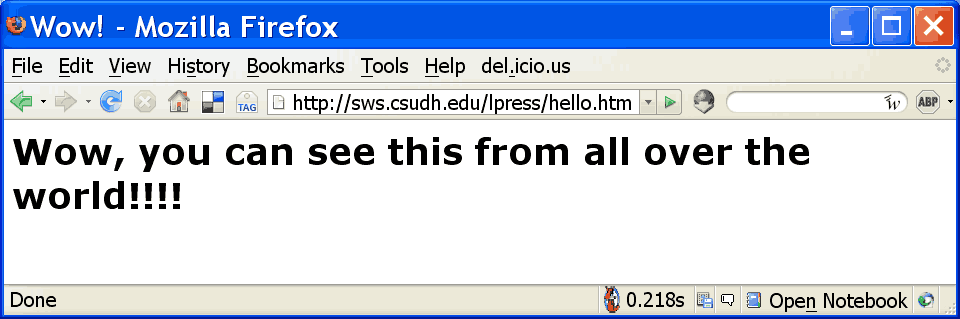
(If you view a changed file, and it appears not to have changed, reload it since it may have been cached by the browser).
When it looks exactly like mine, print it out to turn in. (Note that the screen shot of your Web page should be made from the server, sws.csudh.edu, not your local hard drive).
Also print and turn in a screen shot of FileZilla showing the files in your directory on the server.
Link to topic module
Sunday, October 31, 2010
Attributes and their values
This assignment will let you experiment with the attributes of the <hr />
tag and test your understanding of the terms tag, attribute and value.
Create a Web page with two paragraphs separated by a horizontal rule. The paragraphs can say anything you wish and the horizontal rule should look like this:
(the color is blue and it is 100 pixels wide, five pixels tall and centered.)
Experiment with the values of the attributes, and change the horizontal rule so that it is that is 20 pixels tall, 300 pixels wide, red, and on the left hand side of the window.
Do a second experiment in which the horizontal rule is the same except that its width is 50% of the window no matter how you resize it. (Be sure to resize the window to see if the horizontal rule resizes correctly).
Print out and turn in the HTML source and the resulting page displayed in a browser window for the original page and for both of your experiments.
Link to topic module
tag and test your understanding of the terms tag, attribute and value.
Create a Web page with two paragraphs separated by a horizontal rule. The paragraphs can say anything you wish and the horizontal rule should look like this:
(the color is blue and it is 100 pixels wide, five pixels tall and centered.)
Experiment with the values of the attributes, and change the horizontal rule so that it is that is 20 pixels tall, 300 pixels wide, red, and on the left hand side of the window.
Do a second experiment in which the horizontal rule is the same except that its width is 50% of the window no matter how you resize it. (Be sure to resize the window to see if the horizontal rule resizes correctly).
Print out and turn in the HTML source and the resulting page displayed in a browser window for the original page and for both of your experiments.
Link to topic module
Saturday, October 30, 2010
Basic HTML tags
The purpose of this assignment is get you used to demonstrate the mechanics of creating HTML pages and to see the effect of a few common tags.
For this exercise, you will create an HTML document, but instead of making it available on the Web, you will store it locally. Do not use a word processing program for this assignment, use a text editor. (The Notepad text editor is available on computers running Microsoft Windows).
You are to prepare a two paragraph document. Tell about yourself, your job, sports teams -- whatever you want. In addition to making up two paragraphs, put your name in the indicated spot. The marked up document should look like this:
<html>
<head>
<title>My first HTML document</title>
</head>
<body>
<h2> put your name here </h2>
<hr />
<p>
text of your first paragraph
</p>
<p>
text of your second paragraph
</p>
</body>
</html>
Print your document as it appears in the editor and as it appears when viewed using a Web client, and turn in both.
Create a second version of the file without the HTML tags -- just leave your name and the two paragraph description. View that version using a Web client and print it out to turn in. What changed when you deleted the HTML tags?
Link to topic module
For this exercise, you will create an HTML document, but instead of making it available on the Web, you will store it locally. Do not use a word processing program for this assignment, use a text editor. (The Notepad text editor is available on computers running Microsoft Windows).
You are to prepare a two paragraph document. Tell about yourself, your job, sports teams -- whatever you want. In addition to making up two paragraphs, put your name in the indicated spot. The marked up document should look like this:
<html>
<head>
<title>My first HTML document</title>
</head>
<body>
<h2> put your name here </h2>
<hr />
<p>
text of your first paragraph
</p>
<p>
text of your second paragraph
</p>
</body>
</html>
Print your document as it appears in the editor and as it appears when viewed using a Web client, and turn in both.
Create a second version of the file without the HTML tags -- just leave your name and the two paragraph description. View that version using a Web client and print it out to turn in. What changed when you deleted the HTML tags?
Link to topic module
Subscribe to:
Posts (Atom)